Press play on every format
Reezn
Every format. One timeline. Zero friction.
- v2.0.20 BUILD
- ~34 MB SIZE
- Android 5.0+ OS
- 4.4/5 · 12.4k ratings
Download Reezn APK v2.0.20, the free ~34 MB Android media player built for personal libraries: organized shelves, one-tap Chromecast, subtitle controls, and a dark interface made for night viewing.
This is the official download source for Reezn. Every build is scanned for malware and installed on real test phones before the download button goes live, and this page always describes the exact file you are getting.
v2.0.20 · ~34 MB · ANDROID 5.0+ · SCANNED ON REAL DEVICES
CHAPTERS On this page
· Now showing · Scene 01
What Is Reezn?
Reezn is a focused Android media player built around one idea: your videos and music, organized and playable in a single dark, distraction-free interface. Version 2.0.20 keeps the formula tight: a personal library, a capable player core, and casting to the big screen.
The download on this page is the exact v2.0.20 build at ~34 MB, scanned and installed on real test phones before the button went live. This is the official download source for the Reezn APK, and this page always describes the precise file you are getting.
It suits anyone who keeps a personal collection on their phone: downloaded shows, home videos, music files. The Reezn APK installs in seconds, with no crowded home screen of recommendations and no account wall in front of playback. Open it, find your file, press play.
· Feature presentation · Scene 02
Standout Features
Six reasons the player earns its home-screen slot.
TRACK 1
Personal media library
Automatic organization of your video and audio files into browsable shelves, with resume points so long movies pick up where you left off.
TRACK 2
Chromecast support
Send whatever is playing to a Chromecast-compatible TV in a tap, and keep using your phone as the remote.
TRACK 3
Subtitle controls
Load external subtitle files, shift timing when captions drift out of sync, and size the text for comfortable reading.
TRACK 4
Gesture controls
Swipe for volume and brightness, double-tap to skip, pinch to zoom the frame. The basics are all under your thumbs.
TRACK 5
Background audio
Keep listening with the screen off, which turns long talks and music into a pocket podcast player.
TRACK 6
Offline-first design
Everything works without a connection. Your library is on your device, so playback never depends on a server.
Together these make the Reezn APK less of a utility and more of a habit: the thing you open when the lights go down and the opening credits roll.
· Coming soon · Scene 03
What's New in v2.0.20
v2.0.20 is a refinement release. Playback startup is faster on mid-range phones, the library scan misses fewer files on Android 13 and newer, and subtitle timing drift on long files is fixed.
Casting setup is more forgiving too: the app now retries the handshake when your TV takes a moment to appear on the network, instead of failing silently.
If you are coming from an older build, updating keeps your resume points and playlists. Install the new Reezn APK over the old one; nothing in your library is touched.
· Reel change · Scene 04
Install in Five Reels
From Reezn APK download to first playback in about two minutes.
Tap the ticket button at the top of this page and head to the Reezn APK download page, where the file unlocks after a short countdown.
Open reezn.apk from your notification shade or the Downloads folder.
Allow your browser to install apps when Android asks, then tap Install.
On first launch, grant storage permission so the player can index your media folders.
Give it a minute to scan, then press play on anything in your library.
· Trailer · Scene 05
Reezn in Action
Real captures from the v2.0.20 build running on our test phones.
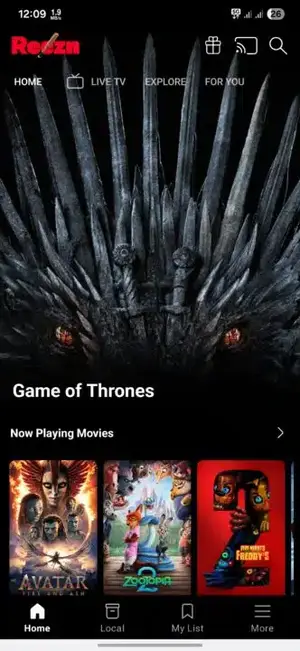
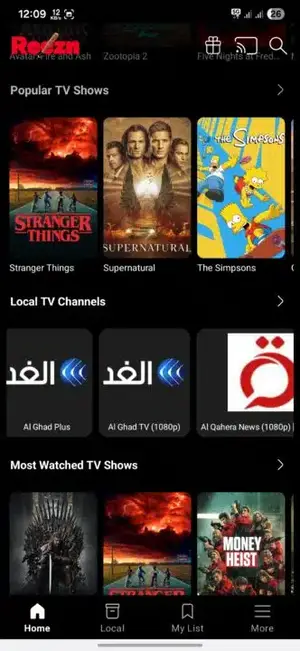
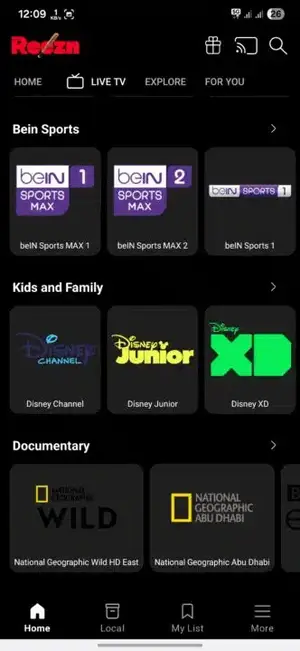
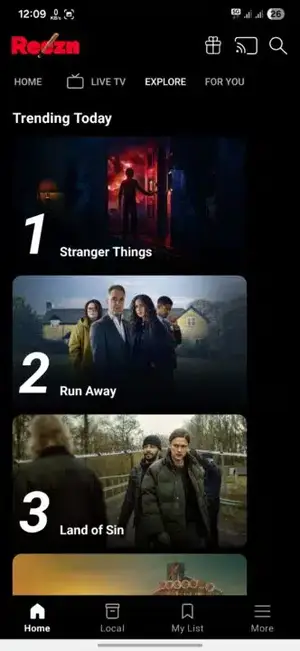
The interface stays dark and quiet on purpose: big artwork, readable rows, and a bottom bar that never hides what you need. What you see here is the actual Reezn APK running on a test phone, not a mockup.
· Matinee · Scene 06
Why Movie Fans Pick Reezn
Most stock video players do the minimum: they play the file and little else. People switch to the Reezn APK when they want their library treated like a collection instead of a file list.
The dark interface is the first thing regulars mention. It is easy on the eyes during night viewing and keeps the focus on the video, not the chrome around it.
Casting seals it for households. Start a movie on the phone during dinner prep, throw it to the living-room TV when everyone sits down, and never touch a cable.
And because it is a ~34 MB install with no account requirement for core playback, it earns a spot even on phones where storage is tight. Grab the Reezn APK download and see how fast the first scan finishes.
· Intermission · Scene 07
Fixing Playback Problems
The four glitches viewers report most, in the order to try them.
Still stuck? The Reezn APK install guide in the projection room walks through the rarer errors step by step.
FIX 1
Video plays but there is no sound
The audio track uses a codec your phone's decoder skips. In playback settings, switch the audio output mode, or remux the file with a compatible track.
FIX 2
Subtitles are out of sync
Open subtitle settings during playback and nudge the delay in 100ms steps until dialogue lines up. The fix applies to that file only.
FIX 3
App stutters on 4K files
Drop the playback resolution one step or enable hardware decoding in settings. Mid-range phones handle 1080p smoothly where 4K chokes.
FIX 4
Library scan misses files
Check that the folder is not in an excluded path and that storage permission is granted. A manual rescan from settings picks up stragglers.
· Credits · Scene 08
Technical Details
The Reezn APK build is signed and unmodified. The file size (~34 MB) and package name above let you confirm your copy matches the genuine release.
- Package
com.rmedia.rplayer- Version
- 2.0.20
- File size
- ~34 MB
- Minimum Android
- 5.0 (API 21)
- Tested through
- Android 16
- Architectures
- arm64-v8a, armeabi-v7a
- Permissions
- Storage, network, cast discovery
- License
- Free, optional premium plans
· Encore · Scene 09
Pros and Cons
For a free player, the Reezn APK's trade-offs are honest ones: the core experience costs nothing, and the paywalled bits are conveniences, not essentials.
What lands
- Genuinely dark interface that suits night viewing
- Reliable Chromecast handoff on tested networks
- Subtitle timing controls that actually work
- Light ~34 MB install, no bloat
- No account needed for core playback
What needs work
- Offline mode tied to premium plans
- Some niche audio codecs need workarounds
- No desktop companion app
· Q and A · Scene 10
Frequently Asked Questions
Straight answers about the app, the file, and the install. Anything else lives in the Reezn APK projection room guides.
What is the Reezn APK?
It is the Android installation file for Reezn v2.0.20, a media player for organizing and playing personal video and audio. This page hosts the exact ~34 MB file described above, scanned and tested before the download button went live.
Is Reezn free?
Core playback is free. Account creation costs nothing and unlocks the basic feature set; offline mode and some extras sit on premium plans.
Is this download safe?
The file on the download page is scanned for malware and installed on real test phones before the button goes live. Download it from this page and check that the file size (~34 MB) matches to be sure you have the genuine build.
Which Android versions are supported?
Android 5.0 and up. The player is verified on phones running Android 12 through 16 on our test bench.
Does Reezn support Chromecast?
Yes. Tap the cast icon during playback and pick your TV. Phone and TV must be on the same Wi-Fi network.
Can I use external subtitles?
Yes. Load .srt files from the subtitle menu during playback and adjust the timing offset if captions drift.
Will it play 4K video?
It attempts 4K on capable hardware. On mid-range phones, 1080p is the smooth choice; enabling hardware decoding in settings helps.
Do I need an account?
No. Core playback works without signing in. An account unlocks extras like premium features and offline mode.
How do I update to a newer version?
Download the newer APK from this site and install it over the existing app. Your library, resume points, and playlists carry over.
· Final reel · Scene 11
Final Verdict
Reezn v2.0.20 does exactly what a media player should: it gets out of the way. The library is quick to browse, playback controls feel immediate, and casting just works on the networks we tested.
It is not trying to be a streaming service or a social app, and that restraint is the point. If your media lives on your device, this is one of the cleanest ways to watch it.
Download the Reezn APK from the official source on this site, give the scan a minute on first launch, and your pocket cinema is open.